

Wige‑IPTV blends live television and on‑demand streaming into a single, easy‑to‑use service. This guide explains what Wige‑IPTV does, how it delivers content, and the benefits you can expect as traditional pay‑TV options evolve. By combining modern IPTV and OTT technologies, Wige‑IPTV delivers high‑quality streams, flexible device support, and subscription choices built for people who want more control over their viewing—and their budget. Below we cover how the service works, top features, device compatibility, plan options, legal and security considerations, and quick setup tips to get you streaming fast.
Key Takeaways
- Wige‑IPTV delivers live TV and on‑demand content over the internet for flexible viewing.
- Adaptive bitrate streaming automatically adjusts video quality to match your connection.
- A broad channel lineup covers sports, movies, news and entertainment across multiple resolutions.
- Works on smart TVs, streaming sticks, phones and tablets for true multi‑device access.
- Subscription tiers—from basic to premium—fit different budgets and viewing habits.
- Content is provided under license, and the platform uses encryption and secure payments.
- You can stream from anywhere with an internet connection—handy for travel and mobile use.
- Parental controls let families restrict content and keep viewing age‑appropriate.
- Getting started usually means creating an account, installing the app, and checking device compatibility.
What is Wige‑IPTV and How Does It Work?
Wige‑IPTV uses Internet Protocol Television (IPTV) to send television content over the internet instead of through traditional cable or satellite lines. Television signals are encoded into data packets and streamed to your device, which lets you watch live channels and on‑demand titles without relying on physical infrastructure. The result is a more flexible, often more affordable way to access TV—watch when you want, on the devices you already own.
Two core services typically power IPTV offerings: live television and Video on Demand (VoD).
Key Services Offered by IPTV Providers: Live TV and On‑Demand (VoD)
IP‑VoD—Internet Protocol Video on Demand—is a central feature for IPTV providers. Alongside standard live TV and high‑definition channels, VoD gives viewers access to a library of movies and series they can start anytime.
Next generation IPTV services and technologies, 2008
Understanding IPTV and OTT Streaming Technologies
IPTV delivers television via internet protocols, enabling real‑time streams for live broadcasts and on‑demand content. OTT (Over‑The‑Top) services bypass traditional distribution—like cable headends—and deliver content straight to viewers over the open internet. Wige‑IPTV leverages both approaches where appropriate to give a versatile, user‑friendly experience that matches how people watch today.
Despite clear benefits, wide IPTV adoption requires addressing architectural and deployment hurdles.
IPTV Trends, Deployment, and Adoption Challenges
Wider deployment of IPTV and peer‑to‑peer systems depends on solving technical and infrastructure issues—scalability, latency, and consistent quality across networks are common hurdles.
Internet protocol television (IPTV): architecture, trends, and challenges, S Zeadally, 2011
How Wige‑IPTV Delivers Live TV and On‑Demand Content
Wige‑IPTV uses modern streaming protocols and adaptive bitrate delivery so video quality adjusts to your current internet speed—reducing buffering and preserving the best possible picture. That makes live sports, breaking news, and scheduled broadcasts watchable in real time, while the on‑demand library lets you pause, rewind or catch up whenever it suits you.
What Are the Key Features of Wige‑IPTV Service?
Wige‑IPTV focuses on features that improve everyday viewing: a wide channel selection, configurable streaming quality, and an interface built for easy navigation across devices. Those core elements aim to make the service convenient for both casual viewers and power users.
Channel Availability and Streaming Quality Options
The service offers a diverse channel lineup spanning sports, films, news and general entertainment. Stream quality ranges from SD and HD up to UHD on supported channels, so you can balance picture fidelity with data usage depending on your connection.
User Interface and Multi‑Device Compatibility
The Wige‑IPTV interface is designed to be simple and fast: browse channels, search for titles, and manage favorites with minimal clicks. The platform supports a broad array of devices—so whether you’re on a smart TV, phone or streaming stick, you’ll find a familiar, responsive experience.
Accessibility and device compatibility are critical factors for OTT platforms to reach and retain users.
Factors for OTT Platform Success: Accessibility and Device Compatibility
Successful OTT services prioritize broad device support and easy access—two factors that strongly influence adoption across markets.
Factors Influencing The Success Of OTT Platforms: A Literature Review
Which Devices Support Wige‑IPTV Streaming?
Wige‑IPTV runs on many common consumer devices, giving you flexibility to watch at home or on the go. This compatibility is a core part of delivering a smooth, consistent experience wherever you stream.
Compatible IPTV Streaming Devices and Platforms
- Smart TVs: Many modern smart TVs include apps or app stores where Wige‑IPTV is available.
- Streaming Devices: Popular players like Roku, Amazon Fire TV and Apple TV can run the Wige‑IPTV app.
- Mobile Devices: Native apps for Android and iOS let you stream on smartphones and tablets.
Using Live TV Streaming Apps with Wige‑IPTV
You can also access Wige‑IPTV through compatible live TV apps that link to your account. Setup is usually straightforward: install the app, sign in, and follow on‑screen prompts to connect your device—then you’re ready to watch from anywhere with internet access.
What Subscription Plans Does Wige‑IPTV Offer?
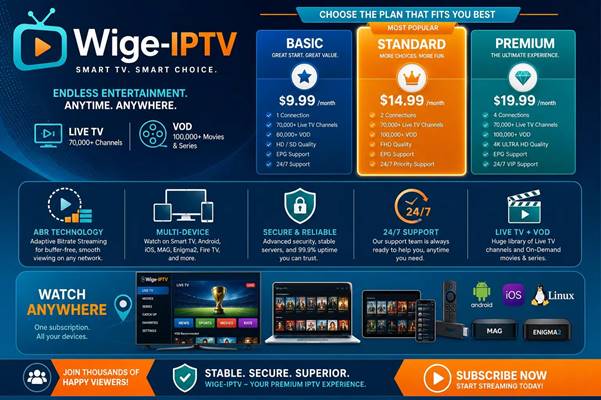
Wige‑IPTV offers multiple subscription tiers so you can pick the balance of channels and features that fits your needs and wallet.
Flexible IPTV Subscription Plans and Pricing Models
- Basic Plan: Access to essential channels at an entry‑level price.
- Standard Plan: More channels and extra features for everyday viewing.
- Premium Plan: The largest channel selection and premium content for heavy viewers.
Plans are structured to suit different budgets while ensuring access to meaningful content and features.
How to Choose the Best IPTV Service Provider for Your Needs
When comparing providers, weigh channel lineup, stream quality, supported devices and customer support. Wige‑IPTV aims to be competitive on all those fronts, pairing a broad content selection with straightforward apps and support options.
Are Wige‑IPTV Services Legal and Secure?
Questions about legality and security are natural with any streaming service. Wige‑IPTV addresses both by operating under licensing agreements and implementing standard security practices to protect users.
Legal Considerations for IPTV and OTT Streaming Services
Wige‑IPTV offers licensed content and follows the legal and regulatory frameworks that apply to IPTV and OTT distribution. Using licensed sources helps ensure stable long‑term access to channels and on‑demand titles.
Security Features and User Privacy Protection
The platform uses encryption and secure payment processing to protect personal and billing information. Privacy safeguards and best‑practice security protocols help keep accounts and viewing data safe.
How to Get Started with Wige‑IPTV Service?
Starting with Wige‑IPTV is designed to be quick and user‑friendly so you can begin streaming in minutes.
Setting Up Your Wige‑IPTV Account and Devices
Create an account on the Wige‑IPTV site, select a subscription, then install the app on your chosen device(s). Sign in with your credentials and follow the setup prompts to verify compatibility and optimize settings.
Tips for Optimizing Your Streaming Experience
- Stable Internet Connection: Use a reliable broadband or Wi‑Fi connection to reduce buffering.
- Device Updates: Keep apps and device firmware current for best performance and security.
- Explore Features: Customize channel lists, enable parental controls, and use quality settings to match your data limits.
By following these steps you’ll get the most consistent playback and access to available features.
Frequently Asked Questions
What types of content can I access with Wige‑IPTV?
Wige‑IPTV provides live TV channels plus a library of on‑demand movies and series across genres—sports, news, entertainment, documentaries and more. The catalog is updated regularly so subscribers can find recent releases and popular titles alongside classic programming.
Can I use Wige‑IPTV while traveling?
Yes. As long as you have a compatible device and internet access, you can stream Wige‑IPTV away from home. Make sure your account is active and the app is installed on your mobile device before you travel.
Is there a free trial available for Wige‑IPTV?
Wige‑IPTV may run promotional free trials or introductory offers from time to time. Trials typically provide limited access so you can evaluate the service. Check the official site or contact customer support for the latest trial availability and terms.
What should I do if I experience streaming issues with Wige‑IPTV?
Start by checking your internet connection and restarting the app or device. Ensure the Wige‑IPTV app is up to date. If problems continue, consult the support resources or contact customer service for troubleshooting specific to your device and network.
Are there parental controls available on Wige‑IPTV?
Yes. Wige‑IPTV includes parental controls so you can restrict channels and on‑demand content by age or rating. Configure these controls in the app’s settings to create a safer viewing experience for children.
How can I cancel my Wige‑IPTV subscription?
To cancel, sign in to your account on the website or app and go to the subscription or billing section to manage or cancel your plan. Review the cancellation and refund policy for any terms tied to your selected plan, and contact customer support if you need help completing the cancellation.
Conclusion
Wige‑IPTV offers a flexible alternative to traditional TV by combining live channels, on‑demand content and broad device support. With clear subscription tiers, licensed content, and standard security measures, it’s built to meet modern viewing habits. If you value choice and convenience, try Wige‑IPTV and see how internet‑delivered TV fits into your routine.

0 Comments