

Live TV has shifted from cable boxes to flexible streaming packages that fit how people watch today. These packages combine sports, news, and entertainment so you can pick the channels you actually use. This guide walks through the top live TV options for 2024, compares channel lineups and features, and shows how to stream sports without traditional cable. You’ll also get a clear look at pricing models and practical tips to make your streaming setup run smoothly.
Key Takeaways
- YouTube TV, Hulu + Live TV, Sling TV, DirecTV Stream, and FuboTV remain among the top live TV services in 2024.
- Package tiers determine which channels you get and how much you pay — from budget basics to premium bundles with extra networks.
- IPTV plans differ by provider and region, with many offering customizable add-ons for sports, news, and entertainment.
- Standalone streaming services like ESPN+, DAZN, and NBC Sports let you watch live sports without a cable subscription.
- Most services work on popular devices such as Roku, Amazon Fire TV, and Apple TV for easy, flexible viewing.
- Cloud DVR is widely available, so you can record games and shows and watch them later.
- Free trials and tiered pricing help you test services and find the best value for your budget.
- Streaming often offers a more flexible and cost-effective alternative to cable and satellite packages.
- To optimize streaming: use a stable internet connection, keep apps updated, and follow device-specific setup steps to reduce buffering and interruptions.
Which Live TV Packages Offer the Best Channel Lineups in 2024?
As cord-cutting grows, several providers stand out for broad channel selections and solid user experiences. Knowing how each service stacks up helps you choose the right fit for your viewing habits and budget.
Top Providers: YouTube TV, Hulu + Live TV, Sling TV, DirecTV Stream, and FuboTV
These platforms lead the pack in 2024, each with distinct strengths and channel mixes:
- YouTube TV: Offers a large channel lineup—over 85 channels including major networks and local stations—plus unlimited cloud DVR for easy recording.
- Hulu + Live TV: Blends live channels with Hulu’s on-demand library, delivering both live broadcasts and a deep streaming catalog across roughly 75+ channels.
- Sling TV: A cost-conscious, modular option that lets you build a custom channel package from lower starting prices.
- DirecTV Stream: Mimics the traditional pay-TV experience with broad channel selections and multi-device streaming support.
- FuboTV: Geared toward sports fans with a wide array of sports networks, including national and regional coverage.
How Do Package Tiers Affect Channel Availability and Pricing?
Most live TV services use tiered plans that balance price and channels. Picking the right tier depends on the networks you want and how much you’re willing to spend.
- Basic Tier: Covers essential local stations and popular cable channels at the lowest cost—good for light viewers.
- Standard Tier: Expands entertainment and news options for a moderate price increase, suited for most households.
- Premium Tier: Bundles premium networks like HBO or Showtime with the full channel list—best for viewers who want extensive on-demand and live content.
Compare tiers side-by-side to match channels with your viewing priorities and budget limits.
What Are the Most Popular IPTV Subscription Plans and Their Features?
IPTV plans are popular for their flexibility and regional variety. Below we break down common features and what to watch for when comparing providers.
Comparing IPTV Providers: Channel Lists and Regional Availability
Channel availability often depends on geography, so check each provider’s regional offerings before you subscribe. Some emphasize local and regional sports, while others focus on national networks.
- Provider A: Broad lineup with regional sports networks available in select markets.
- Provider B: Prioritizes national channels, a solid choice if you value major network coverage over local options.
- Provider C: Mixes both local and national programming to serve a wider audience.
Add-Ons and Premium Channels: Sports, News, and Entertainment Options
Most providers let you customize with add-ons so you only pay for what you want.
- Sports Add-Ons: Extras like NFL RedZone or NBA League Pass for dedicated sports fans.
- News Packages: Additional news channels—CNN, BBC, and others—if you follow current events closely.
- Entertainment Options: Premium networks such as HBO Max or Showtime available as paid upgrades.
Add-ons make it easy to tailor a plan to your interests without overpaying for unused channels.
How Can You Stream Live Sports Channels Without Cable?
Streaming sports without cable is now straightforward, with multiple services offering live events, leagues, and specialty sports coverage. Below are top choices and device compatibility notes.
Best Streaming Services for Live Sports Coverage

These services are especially strong for live sports:
- ESPN+: Wide selection of live events, from college sports to MMA and U.S. soccer.
- DAZN: Specializes in boxing and combat sports with exclusive fight coverage in many regions.
- NBC Sports: Carries Premier League matches and other live national sports broadcasts.
These options let you follow leagues and events without subscribing to a full cable package.
Device Compatibility: Roku, Amazon Fire TV, and Other Streaming Devices
Most streaming platforms support the major streaming players, making setup and watching simple.
- Roku: Broad app support and easy navigation across services.
- Amazon Fire TV: Convenient access to apps and Alexa integration.
- Apple TV: Smooth interface and reliable support for many streaming services.
Confirm support for your device before committing to a service to avoid compatibility headaches.
What Are the Pricing and Subscription Models for Live TV Services?
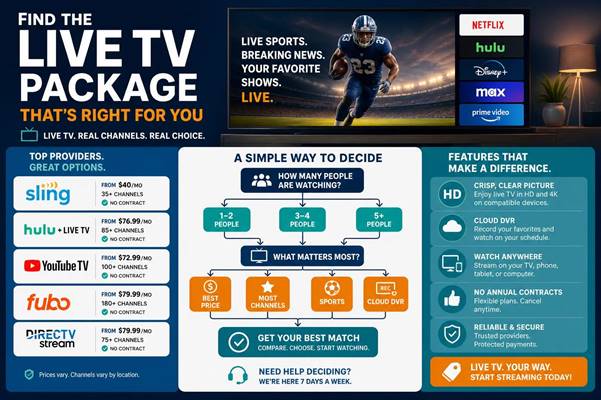
Pricing varies by service and plan tier. Many providers offer trial periods and modular upgrades so you can test the service and adjust later.
Tiered Pricing Structures and Free Trial Offers
Tiers let you choose the level of coverage you need, while free trials offer a risk-free way to evaluate a service.
- Basic Plan: Lower monthly cost with core channels.
- Standard Plan: Mid-tier price with a fuller channel lineup and extra features.
- Premium Plan: Highest level with expanded channel access and premium add-ons.
Look for trial periods and short-term promos when comparing long-term costs.
Comparing Cable TV Alternatives and Satellite TV Channel Lineups
Streaming services often match or exceed traditional cable and satellite lineups and provide more flexible subscription terms.
- Cable TV: Frequently ties you to contracts and higher monthly fees.
- Satellite TV: Can include installation costs and equipment fees that add up.
- Streaming Services: Usually offer month-to-month plans, fewer hidden costs, and easier cancellation.
For many households, streaming is a simpler, more transparent option.
How Do You Set Up and Optimize Your Live TV Streaming Experience?
Good setup and routine maintenance make streaming reliable. Follow these steps to get started and keep performance steady.
Step-by-Step Device Setup Guides for Popular Streaming Platforms
Getting a device ready is usually quick. Here’s a basic flow you can follow:
- Connect the Device: Plug your streaming player into your TV and join your Wi‑Fi network.
- Download the App: Install the provider’s app from the device app store.
- Sign In: Log in with your account to access live channels and features.
These steps will have you watching in minutes.
Troubleshooting Common Streaming Issues and Enhancing Performance
If playback lags or drops, try these quick fixes first:
- Check Your Internet Connection: Make sure your network is stable and fast enough for HD or 4K streaming.
- Restart Your Device: Rebooting the device or router often clears temporary glitches.
- Update the App: Running the latest app version prevents compatibility problems and improves stability.
If issues continue, test connection speeds, reduce other bandwidth use on your network, or contact your provider.
Which Live TV Package Has the Most Sports Channels?
For sports-heavy lineups, FuboTV is a leading choice thanks to its extensive selection of national and regional sports networks, making it a strong pick for fans who want comprehensive live sports coverage.
How to Watch Live TV Without Cable or Satellite?
Switching away from cable or satellite is easier now: subscribe to a live TV streaming service that fits your channel needs, install the app on your device, and start streaming. Services like YouTube TV and Hulu + Live TV offer full live channel bundles that replace traditional subscriptions.
Frequently Asked Questions
What devices are compatible with live TV streaming services?
Most live TV services support a wide range of devices: Roku, Amazon Fire TV, Apple TV, smart TVs from Samsung and LG, plus iOS and Android phones and tablets. Check the specific service’s compatibility page to confirm your device is supported.
Can I record shows with live TV streaming services?
Yes — many services include cloud DVR. For example, YouTube TV offers unlimited DVR storage, while Hulu + Live TV provides a DVR option with a set storage limit. Cloud DVR lets you save programs without using device storage.
Are there any hidden fees with live TV subscriptions?
Most providers list their base prices clearly, but you may encounter extra charges for premium add-ons, equipment rentals, or regional sports fees. Read the provider’s fine print to understand the total monthly cost and any possible surcharges.
How do I cancel my live TV subscription?
Cancellation is usually handled online through the provider’s website or app. Log into your account, go to subscription settings, and follow the cancellation steps. Some services may require contacting customer support—check the provider’s policy before you subscribe.
Can I share my live TV subscription with family or friends?
Many services allow multiple profiles or simultaneous streams, but limits vary. For example, some providers permit several simultaneous streams while others restrict that number or charge for extra users. Review the service’s sharing and streaming rules to avoid surprises.
What should I do if I experience buffering while streaming?
Start by testing your internet speed and ensuring it meets the provider’s recommended bandwidth. Restart your streaming device and router, close background apps that use bandwidth, and try lowering the stream quality if needed. If problems persist, contact your ISP or the streaming service for help.
Conclusion
Picking the right live TV package comes down to the channels you watch, your budget, and the devices you use. Whether you prioritize sports, local channels, or on-demand libraries, services like YouTube TV, Hulu + Live TV, and FuboTV offer strong alternatives to traditional cable. Compare channel lineups, trial offers, and add-ons, then choose the plan that gives you the best mix of value and viewing flexibility.

0 Comments