

Kodi is a flexible media player that lets you shape how you watch and listen. Addons and integrations plug in extra sources and tools — from streaming services to maintenance utilities — so you can tailor Kodi to your needs. This guide walks through what addons do, why they matter, and how to install and manage the best options of 2023. Many users get overwhelmed by the choices; with a clear approach you’ll find, install, and maintain addons with far less fuss. We cover addon types, top picks for 2023, install steps, compatibility tips, and developer resources.
Key Takeaways
- Kodi addons extend the player with streaming, music, utilities, and customizable skins to match how you use Kodi.
- Standout 2023 addons include Exodus Redux, The Crew, Seren, Spotify, YouTube, and OpenVPN to cover movies, live TV, music, and privacy.
- Integrations bridge Kodi with platforms like Netflix and Hulu and improve device compatibility for smoother streaming.
- Install addons through Kodi’s Add-ons menu, pick from repositories, and follow the on-screen prompts for a safe install.
- Keeping addons updated and clearing cache regularly helps performance and resolves many playback issues.
- Verify addon compatibility with your Kodi version and prefer official repositories for better security and stability.
- Research before installing, avoid unverified sources, and consider a VPN to protect your privacy while streaming.
- Developers list update schedules and integration guides on official forums and addon pages — check those for support.
- Kodi customization goes beyond addons: skins, playback settings, and advanced config let you fine-tune the experience.
What Are Kodi Addons and How Do They Enhance Your Media Experience?
Kodi addons are small software packages that expand what Kodi can do. They connect extra content sources and tools so you can watch more shows, listen to more music, and add useful features. The main advantage is control: addons let you shape Kodi around your preferences, whether that means streaming the latest movies, building playlist workflows, or running handy utilities.
Understanding Kodi Addon Categories: Video, Music, Utilities, and Skins
Kodi addons fall into a few clear categories, each with a specific purpose:
- Video Addons: Offer access to streaming libraries — movies, TV shows, and live sports — often via services like Netflix or YouTube integrations.
- Music Addons: Plug into music platforms so you can play playlists, radio, or on-demand tracks inside Kodi. Spotify and SoundCloud are common examples.
- Utility Addons: Improve Kodi’s reliability and convenience with tools for maintenance, file management, or system info.
- Skins: Change Kodi’s look and navigation so the interface fits your preferences and device setup.
How Do Integrations Connect Kodi with Other Platforms?
Integrations let Kodi talk to external services and devices. By connecting with platforms like Netflix or Hulu, or with hardware such as smart TVs and game consoles, Kodi becomes a single hub for your media. That means less switching between apps and a more consistent viewing experience across devices.
Which Are the Best Kodi Addons and Plugins in 2023?

In 2023 several addons consistently deliver solid results. The best choices balance content variety, reliability, and compatibility with current Kodi releases. Below are widely recommended addons based on those criteria.
Top Video and Streaming Addons for Kodi Users
These video addons are reliable picks for 2023:
- Exodus Redux: Offers a large library of movies and TV shows with an approachable interface and regular updates.
- The Crew: A versatile addon that bundles live TV, on-demand movies, and sports into one place.
- Seren: Known for high-quality streams and tight Real-Debrid integration for smoother playback.
Popular Music and Utility Addons to Improve Functionality
Beyond video, these music and utility addons round out a robust Kodi setup:
- Spotify: Integrates your Spotify account so playlists and tracks play directly inside Kodi.
- YouTube: Gives access to the vast YouTube catalog for music videos, clips, and channels.
- OpenVPN: Adds a privacy layer for safer streaming and can help with region-restricted content.
| Addon Name | Type | Features |
| Exodus Redux | Video | Extensive library, user-friendly |
| The Crew | Video | Live TV, movies, sports |
| Seren | Video | High-quality streaming, Real-Debrid integration |
| Spotify | Music | Seamless playlist integration |
| YouTube | Music | Vast video library |
| OpenVPN | Utility | Secure browsing |
This table summarizes the top Kodi addons for 2023 and highlights what each one brings to your setup.
How to Install and Manage Kodi Addons Safely and Effectively?
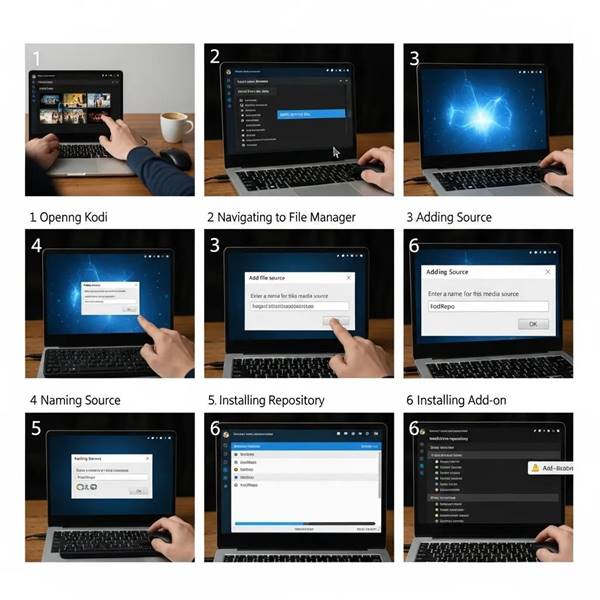
Installing and keeping addons running smoothly is straightforward when you follow a few basic steps and best practices. Below is a beginner-friendly install flow and quick troubleshooting tips.
Step-by-Step Kodi Addon Installation Guide for Beginners
To install a Kodi addon, follow these steps:
- Open Kodi: Start the Kodi app on your device.
- Navigate to Add-ons: Choose the “Add-ons” option from the main menu.
- Install from Repository: Pick “Install from repository” to see available addons.
- Choose the Addon: Browse categories and select the addon you want.
- Install: Press “Install” and follow any prompts to finish the setup.
Troubleshooting Common Kodi Addon Issues and Updates
If an addon misbehaves, try these quick fixes:
- Check Internet Connection: Make sure your device is online and stable.
- Update Addons: Install available updates so addons remain compatible with Kodi.
- Clear Cache: Removing cached data often fixes playback glitches and speed issues.
What Should You Know About Kodi Addon Compatibility and Security?
Compatibility and security matter. Some third-party addons may not work with every Kodi version and can pose privacy or legal risks. Use caution and verify sources before installing.
Ensuring Addon Compatibility with Different Kodi Versions
To avoid version conflicts, follow these steps:
- Check Addon Requirements: Read the addon description for version info and dependencies.
- Use Official Repositories: Official sources reduce the chance of compatibility and security problems.
- Update Kodi Regularly: Running the latest Kodi release gives you the newest features and security fixes.
How to Identify and Use Safe Kodi Addons
Reduce risk with these habits:
- Research Addons: Read reviews, developer notes, and community feedback before installing.
- Avoid Unverified Sources: Don’t install addons from unknown repositories unless you trust the developer.
- Use a VPN: A VPN helps protect your privacy and can prevent ISP-level throttling when streaming.
Where Can You Find Developer Profiles and Integration Tutorials for Kodi?
If you want to build your own addons or integrate services, plenty of developer-focused resources are available.
Exploring Developer Information and Addon Update Frequencies
Addon developers usually publish details about updates and support channels. Check the official Kodi forums, GitHub repositories, or the addon’s website for changelogs and contact information. Regular updates indicate active maintenance and faster bug fixes.
Guides to Integrate Kodi with Streaming Services and Devices
Step-by-step guides and video tutorials walk through common integrations—like connecting Kodi to streaming platforms or optimizing it for different hardware. Use official documentation and community guides to avoid pitfalls and get the most reliable instructions.
With a basic understanding of addon types, install methods, and safety practices, you can greatly improve your Kodi experience. This guide aims to give you the confidence to choose and manage addons that suit your viewing habits.
Frequently Asked Questions
1. Can I use Kodi addons on multiple devices?
Yes. Addons work on any device with Kodi installed, but some addons have platform-specific requirements. Make sure Kodi and the addon are compatible with each device’s operating system and keep everything updated for the best experience.
2. Are there any legal concerns when using Kodi addons?
There can be. Some addons provide access to copyrighted material without proper licensing, which can cause legal issues in certain regions. Stick to official addons and reputable sources, and check local copyright laws if you’re unsure.
3. How can I improve the performance of Kodi addons?
Improve performance by clearing caches, keeping addons and Kodi updated, and using a stable internet connection—preferably wired for heavy streaming. Also check device-specific settings and close other apps that might compete for resources.
4. What should I do if an addon stops working?
Start by checking your internet connection and updating Kodi. If the addon still fails, try reinstalling it. If the addon is no longer maintained, look for alternative addons that offer similar features.
5. How do I uninstall a Kodi addon?
Open Kodi, go to the “Add-ons” menu, find the addon, open the context menu (keyboard “C” or the remote’s menu button), and select “Uninstall.” Confirm the removal and Kodi will delete the addon from your system.
6. Can I customize Kodi beyond just installing addons?
Absolutely. Change skins, tweak audio and video playback settings, create playlists, and dive into advanced configuration files for deeper customization. Kodi is built to be adapted to your preferences.
7. Is it safe to use third-party Kodi addons?
Third-party addons carry more risk because they aren’t always vetted. Reduce exposure by researching addons, choosing well-known developers, avoiding unknown repos, and using a VPN to help protect your privacy.
Conclusion
Addons are the easiest way to expand what Kodi can do — from watching more content to improving performance and privacy. By following the installation steps, checking compatibility, and favoring trusted sources, you’ll keep your Kodi setup reliable and secure. Use this guide to find the best addons of 2023, experiment with integrations, and start shaping Kodi to fit the way you watch and listen.

0 Comments