

With more than 32,000 IPTV channels available, finding the shows and feeds you want can feel impossible. The right approach—combining smart filters, focused searches, and a few advanced techniques—lets you cut through the noise and land on the content that matters. This guide walks you through practical methods, tools, and best practices so you can discover channels quickly and reliably.
Key Takeaways
- Channels are organized by genre, language, and country to make discovery faster and more intuitive.
- Typical IPTV genres include entertainment, sports, news, and documentaries, covering most viewer needs.
- Filtering by country and provider unlocks region-specific and exclusive channel options.
- IPTV search engines index channels so you can search by keyword, genre, or language for quicker results.
- Advanced filters—metadata, semantic tags, and AI—surface personalized and niche recommendations.
- Using structured data (Schema.org) helps search engines understand and surface IPTV channels as rich results.
- Good navigation combines filters, search, and bookmarks to reduce time-to-watch.
- Track KPIs like engagement and search success rate to refine filtering and discovery strategies.
- Keeping up with semantic search and IPTV trends improves long-term discoverability.
What Are IPTV Channel Categories and How Do They Help Filter Channels?
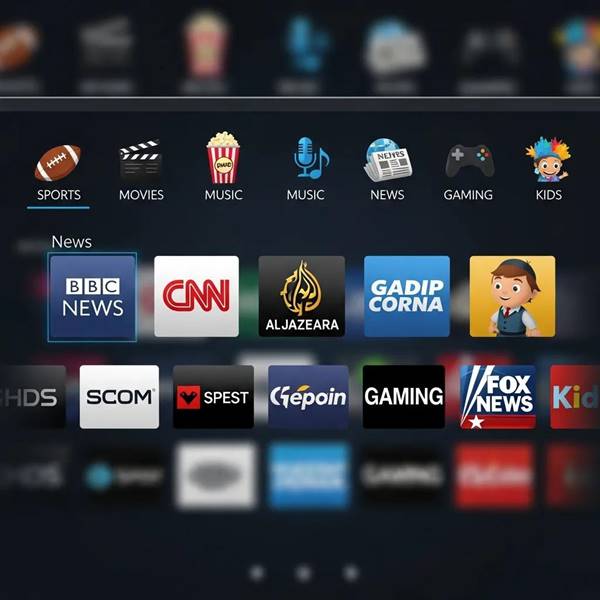
Channel categories group IPTV streams by shared attributes—genre, language, country, and sometimes format or provider. Those groups let you exclude irrelevant content and focus quickly on what you want to watch. Understanding how channels are categorized is the first step to efficient searching across large channel catalogs.
Which Genres and Languages Are Common in IPTV Channel Lists?
Common IPTV genres include:
- Entertainment: Movies, TV series, and reality shows.
- Sports: Live matches, highlights, and analysis programs.
- News: Local, national, and international news feeds.
- Documentaries: Long- and short-form factual programming.
Languages frequently present in IPTV lineups include English, Spanish, French, and Mandarin, among others. A diverse language offering makes channels accessible to more viewers and improves the likelihood of finding content in your preferred language.
How Does Country and Provider Information Enhance Channel Filtering?
Country and provider metadata are powerful filters. They let services show region-appropriate channels—important for local news or sports with territorial rights—and highlight provider-specific exclusives. Using these fields narrows results to legally available and relevant content for your region.
What Tools and Methods Can You Use to Search IPTV Channel Lists?
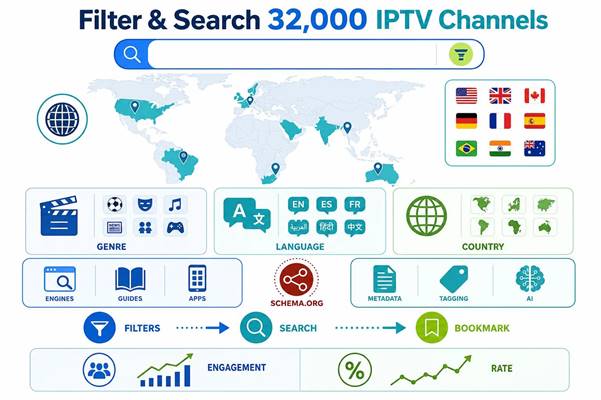
A mix of dedicated search engines, channel guides, and mobile apps makes scanning large IPTV libraries manageable. Each tool fills a role—broad discovery, curated browsing, or fast on-the-go searches—so choose the combination that fits your usage.
How Do IPTV Channel Search Engines Work?
IPTV search engines crawl and index available channels, then return matches based on keywords, genre tags, language, and other metadata. They use ranking rules and simple algorithms to surface the most relevant streams for your query, and often provide filters to narrow results further.
What Are the Best IPTV Channel Filtering Tools Available?

Helpful tools to streamline discovery include:
- IPTV Search Engines: Aggregate listings and let you filter by genre, language, country, and keywords.
- Channel Guides: Curated lists and schedules that make browsing easier than raw directory dumps.
- Mobile Apps: Offer on-device filtering, bookmarking, and quick playback for mobile viewing.
Use a combination of these tools to speed up discovery and keep your favorites organized.
How Can Advanced Filtering Techniques Improve IPTV Channel Discovery?
Advanced filtering brings context to raw listings. By leveraging richer metadata, semantic relationships, and predictive models, systems can suggest channels you didn’t know to look for and prioritize streams that match your viewing habits.
What Role Does Metadata and Semantic Tagging Play in Filtering?
Metadata—detailed tags for genre, language, region, and programming type—lets search systems filter precisely. Semantic tagging connects related content (for example, tagging a sports event with team names, competition, and season), enabling searches that understand intent rather than only matching exact keywords.
How Can AI and Machine Learning Enhance IPTV Channel Search?
AI and machine learning analyze what you watch, when, and how long, then surface personalized channel recommendations. Over time these models become better at predicting what you’ll like—helping you discover niche channels, local feeds, or live events that fit your tastes.
How to Implement Structured Data for IPTV Channel Search and Filtering?
Structured data makes channel listings machine-readable for search engines and discovery tools. Adding standardized markup to channel pages helps search platforms identify channel attributes and present richer search results to users.
What Schema.org Markup Types Optimize IPTV Channel Listings?
Schema types such as TVChannel, BroadcastEvent, and VideoObject are useful for IPTV listings. They let you describe channel identity, scheduled broadcasts, and on-demand content so search engines can show richer snippets and accurate metadata in results.
How Does Structured Data Improve Search Engine Visibility?
Structured data helps search engines generate rich snippets—visual, informative results that stand out in SERPs. That visibility increases click-through rates and directs more viewers to accurately described channels, improving overall discoverability.
What Are Best Practices for Using IPTV Channel Guides and Lists?
Good habits make large channel lists practical. Use filters and search first, then refine and save results so you return to relevant channels quickly.
How to Navigate Large IPTV Channel Lists Effectively?
Try these tactics:
- Use Filters: Narrow by genre, language, or country to reduce clutter.
- Search Quickly: Use the search box for direct channel or program name lookups.
- Bookmark Favorites: Save channels you watch often to avoid repeated searches.
These simple steps cut time-to-watch and make browsing less frustrating.
How to Use Filtering Parameters Like Genre, Language, and Country?
When applying filters:
- Pick the most relevant filters for your immediate goal—e.g., live sports vs. on-demand drama.
- Combine filters to focus results (for example, “Spanish + news + country = Spain”).
- Refresh regularly—new channels and lineups appear frequently, so recheck your categories.
Layered filtering produces much more precise results than single-parameter searches.
How to Monitor and Update IPTV Channel Filtering Strategies?
Filtering is not a one-time task. Track performance, collect feedback, and adapt filters as content and user behavior evolve.
What KPIs and Tools Track IPTV Channel Search Performance?
Key metrics include:
- User Engagement: View counts and average watch time per channel.
- Search Success Rate: How often searches lead to channel selection.
- User Feedback: Ratings and comments about search relevance and filtering ease.
Analytics dashboards, search logs, and user surveys give the data you need to optimize filtering rules and metadata quality.
How to Stay Updated with IPTV Industry Trends and Semantic Search?
Stay informed by:
- Following industry news—specialist newsletters and blogs that cover IPTV and streaming tech.
- Joining forums—community discussions often surface practical fixes and new services.
- Attending webinars on semantic search and media discovery to learn current best practices.
Active learning helps you adapt filters to new content types and discovery patterns.
Frequently Asked Questions
What are the benefits of using advanced filtering techniques for IPTV channels?
Advanced filtering finds relevant channels faster by combining detailed metadata, semantic relationships, and personalization. That means less time searching, more time watching, and higher engagement with content that matches your tastes—especially useful for niche interests or crowded catalogs.
How can I ensure that my IPTV channel search is up-to-date?
Keep your listings fresh by monitoring provider updates, enabling alerts for new channels in your favorite genres, and following IPTV news channels or community feeds. Using tools that auto-sync channel lists also reduces the chance of missing recent additions.
What should I do if I can’t find a specific IPTV channel?
First, broaden or simplify your search terms and check regional availability—some channels are geo-restricted. If it’s still missing, contact your provider to confirm carriage or ask about equivalent channels. User forums can also reveal workarounds and alternative streams.
Are there any risks associated with using IPTV services?
Yes. Unofficial or unverified IPTV sources can deliver poor-quality streams and may expose you to legal or security risks. Use reputable providers, verify channel legality, and consider a VPN for privacy. These steps reduce the chance of streaming interruptions or legal issues.
How can I improve my IPTV channel search experience on mobile devices?
Install a dedicated IPTV app with robust filtering, keep it updated, and use features like bookmarks and voice search when available. A stable internet connection and the latest app version improve performance and reduce buffering on mobile.
What are the key performance indicators (KPIs) for evaluating IPTV channel effectiveness?
Measure channel effectiveness with engagement metrics (views, watch time), search success rate (how often users find what they look for), and direct user feedback on filtering and discovery. These KPIs point to where metadata or UX improvements are needed.
Conclusion
Searching and filtering through 32,000+ IPTV channels doesn’t have to be overwhelming. With the right filters, search tools, and structured data in place, you can find relevant channels quickly and build a personalized lineup that fits your viewing habits. Start with clear filters, use intelligent search tools, and track performance—small adjustments deliver big improvements to your IPTV experience.


0 Comments